HitPay Changelog
Discover the latest features, enhancements, and bug fixes that we've implemented to improve your HitPay experience.
HitPay Changelog
Discover the latest features, enhancements, and bug fixes that we've implemented to improve your HitPay experience.
HitPay Changelog
Discover the latest features, enhancements, and bug fixes that we've implemented to improve your HitPay experience.
January 21, 2026
Multi-Currency, Mart Theme, and Invoice Editing
Online Store •
Invoicing •
This release introduces multi-currency support for the online store, a new Mart theme designed for large product catalogs, and the ability to edit invoices even after payment
January 21, 2026
This release introduces multi-currency support for the online store, a new Mart theme designed for large product catalogs, and the ability to edit invoices even after payment
January 21, 2026
Online Store
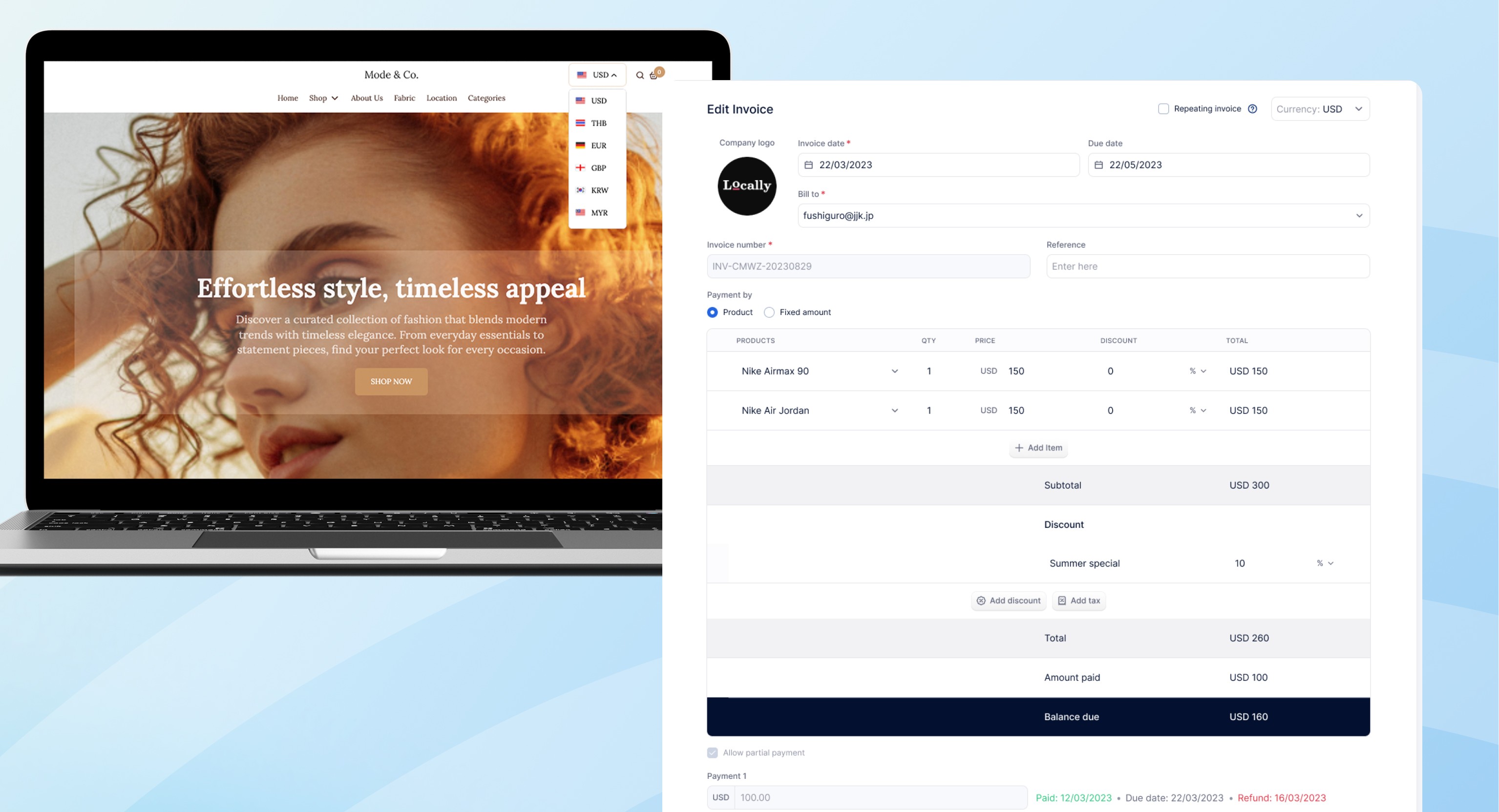
Multi-Currency [Docs] : You can now sell globally using the Multi-Currency Converter, making cross border selling feel as local as selling at home. With multi-currency, you can:
Show prices and accept payments in your customers’ local currency
Accept local QR payments like PayNow, QRIS, QRPH, and more, with lower fees than cards
Reduce checkout friction and abandoned carts caused by foreign currency confusion
Improve conversion with familiar pricing and payment methods
Expand into new markets without needing a local entity or bank account
Stay in full control of FX rates with automatic or manual pricing and optional markups
New Mart Theme: We’ve launched the Livingdepo (Mart) theme for the Online Store, built specifically for merchants with large catalogs or multiple product categories. This theme is designed to help customers find products faster and browse more efficiently, which means less friction and better conversion for your store. With the Mart theme, you get:
Search first experience so customers can quickly find what they’re looking for
Search optimised pages with side category navigation, price range filters, and sorting options, making it easy for customers to browse and switch between product categories
Multi-product banners that let you showcase multiple products at once, making it easy to highlight bestsellers, promotions, or featured products directly in your banner
A new Product Feed section that displays categories on the side with products listed under each one, plus sorting options directly on the homepage
Ideal for: grocery stores, home goods, electronics, lifestyle stores, or any merchant selling a wide range of products.
Invoice
Edit Paid Invoices [Docs]: You can now edit invoices even after a partial or full payment has been made. This gives you more flexibility to manage real world billing scenarios such as deposits, staged payments, or post payment adjustments without needing to cancel invoices or issue new ones. With this update, invoices clearly display Amount Paid and Balance Due, so you always have full visibility into what’s been collected and what’s still outstanding. You can apply discounts, adjust line items, or update totals as needed, as long as the revised total is not lower than the amount already paid.
January 21, 2026
Multi-Currency, Mart Theme, and Invoice Editing
Online Store •
Invoicing •
This release introduces multi-currency support for the online store, a new Mart theme designed for large product catalogs, and the ability to edit invoices even after payment
January 21, 2026
This release introduces multi-currency support for the online store, a new Mart theme designed for large product catalogs, and the ability to edit invoices even after payment
January 21, 2026
Online Store
Multi-Currency [Docs] : You can now sell globally using the Multi-Currency Converter, making cross border selling feel as local as selling at home. With multi-currency, you can:
Show prices and accept payments in your customers’ local currency
Accept local QR payments like PayNow, QRIS, QRPH, and more, with lower fees than cards
Reduce checkout friction and abandoned carts caused by foreign currency confusion
Improve conversion with familiar pricing and payment methods
Expand into new markets without needing a local entity or bank account
Stay in full control of FX rates with automatic or manual pricing and optional markups
New Mart Theme: We’ve launched the Livingdepo (Mart) theme for the Online Store, built specifically for merchants with large catalogs or multiple product categories. This theme is designed to help customers find products faster and browse more efficiently, which means less friction and better conversion for your store. With the Mart theme, you get:
Search first experience so customers can quickly find what they’re looking for
Search optimised pages with side category navigation, price range filters, and sorting options, making it easy for customers to browse and switch between product categories
Multi-product banners that let you showcase multiple products at once, making it easy to highlight bestsellers, promotions, or featured products directly in your banner
A new Product Feed section that displays categories on the side with products listed under each one, plus sorting options directly on the homepage
Ideal for: grocery stores, home goods, electronics, lifestyle stores, or any merchant selling a wide range of products.
Invoice
Edit Paid Invoices [Docs]: You can now edit invoices even after a partial or full payment has been made. This gives you more flexibility to manage real world billing scenarios such as deposits, staged payments, or post payment adjustments without needing to cancel invoices or issue new ones. With this update, invoices clearly display Amount Paid and Balance Due, so you always have full visibility into what’s been collected and what’s still outstanding. You can apply discounts, adjust line items, or update totals as needed, as long as the revised total is not lower than the amount already paid.
January 21, 2026
Multi-Currency, Mart Theme, and Invoice Editing
Online Store •
Invoicing •
This release introduces multi-currency support for the online store, a new Mart theme designed for large product catalogs, and the ability to edit invoices even after payment
January 21, 2026
This release introduces multi-currency support for the online store, a new Mart theme designed for large product catalogs, and the ability to edit invoices even after payment
January 21, 2026
Online Store
Multi-Currency [Docs] : You can now sell globally using the Multi-Currency Converter, making cross border selling feel as local as selling at home. With multi-currency, you can:
Show prices and accept payments in your customers’ local currency
Accept local QR payments like PayNow, QRIS, QRPH, and more, with lower fees than cards
Reduce checkout friction and abandoned carts caused by foreign currency confusion
Improve conversion with familiar pricing and payment methods
Expand into new markets without needing a local entity or bank account
Stay in full control of FX rates with automatic or manual pricing and optional markups
New Mart Theme: We’ve launched the Livingdepo (Mart) theme for the Online Store, built specifically for merchants with large catalogs or multiple product categories. This theme is designed to help customers find products faster and browse more efficiently, which means less friction and better conversion for your store. With the Mart theme, you get:
Search first experience so customers can quickly find what they’re looking for
Search optimised pages with side category navigation, price range filters, and sorting options, making it easy for customers to browse and switch between product categories
Multi-product banners that let you showcase multiple products at once, making it easy to highlight bestsellers, promotions, or featured products directly in your banner
A new Product Feed section that displays categories on the side with products listed under each one, plus sorting options directly on the homepage
Ideal for: grocery stores, home goods, electronics, lifestyle stores, or any merchant selling a wide range of products.
Invoice
Edit Paid Invoices [Docs]: You can now edit invoices even after a partial or full payment has been made. This gives you more flexibility to manage real world billing scenarios such as deposits, staged payments, or post payment adjustments without needing to cancel invoices or issue new ones. With this update, invoices clearly display Amount Paid and Balance Due, so you always have full visibility into what’s been collected and what’s still outstanding. You can apply discounts, adjust line items, or update totals as needed, as long as the revised total is not lower than the amount already paid.