Online
Cross - Border
See Their Success Stories
Discover how businesses are growing with HitPay, through real stories, results, and experiences from our merchants.
See How Merchants Use HitPay
Developer Resources
Explore our comprehensive developer resources designed to enhance your experience. From detailed API documentation to interactive tutorials.
Accept in-person payments with HitPay Scan to Pay
Author:
The HitPay Team
Last Updated:
Accept easy in-person payments with Scan to Pay — now available in the Philippines.
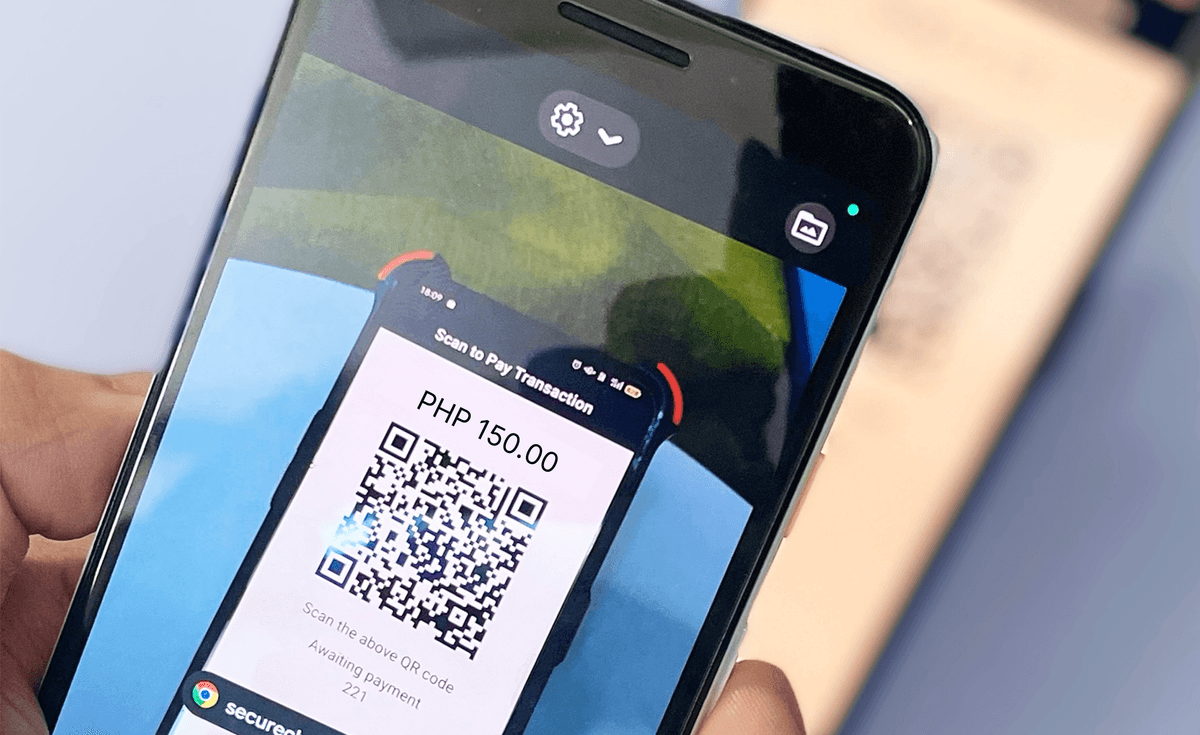
With Scan to Pay, you can accept in-person payments directly through the free HitPay app! It's simpler than a credit card terminal and can be set up instantly.
Why use Scan to Pay?
🤳🏻 Completely contactless — With Scan to Pay, you can easily accept all digital payments in the Philippines. Your customer simply scans the QR code on your HitPay app, and makes payment on their own phone.
⚡️Extremely efficient — Scan and pay in just seconds. All you need is the HitPay iOS or Android app on your phone.
💰 Full range of HitPay payment methods — Scan to Pay supports all popular payment methods in the Philippines:
Unionbank Online
Instapay
QR Ph
PESONet
GCash
Over the counter payments
Domestic and International Cards
Billease
GrabPay
📧 Easy remarketing — The Scan to Pay feature helps collect customer emails for your future marketing needs.
Syncs with orders anywhere you sell — Scan to Pay automatically syncs with your HitPay-enabled payments on any sales channel. Learn more about our useful POS software features here.
⚡️Free to install — The HitPay app is free to install and use on your phone. Only pay per transaction.
How to use HitPay Scan to Pay
You can use Scan to Pay in just 3 simple steps.
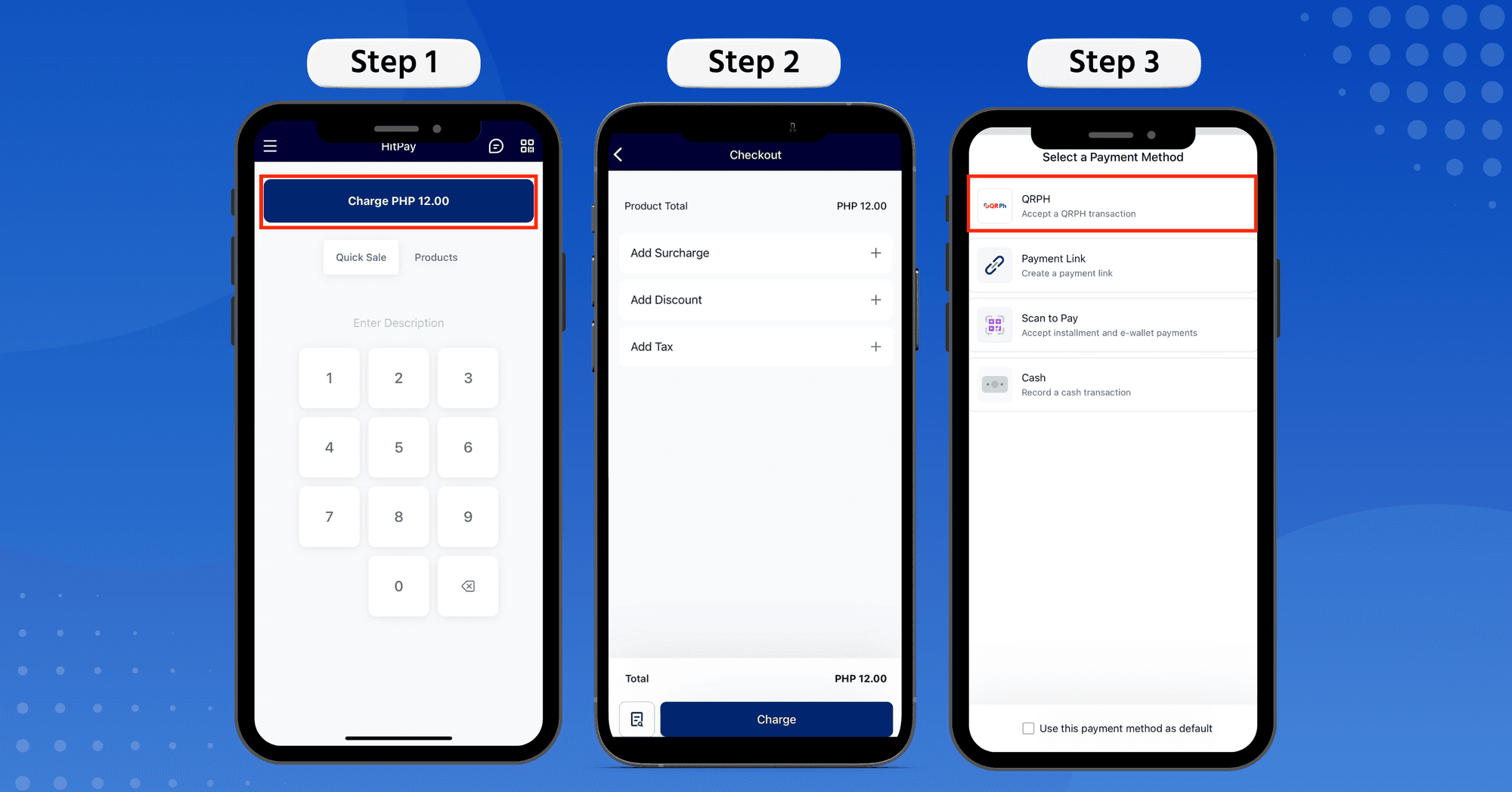
Step 1: Open the HitPay app on your phone.
Enter the amount to charge and press the blue Charge button
Step 2: Select Scan to Pay payment method from the dropdown menu
Step 3: Ask your customer to scan the generated QR using their phone camera or QR code scanner.
After scanning the QR code, the customer can select their preferred payment method and complete the payment. This is done securely on your customer's phone.
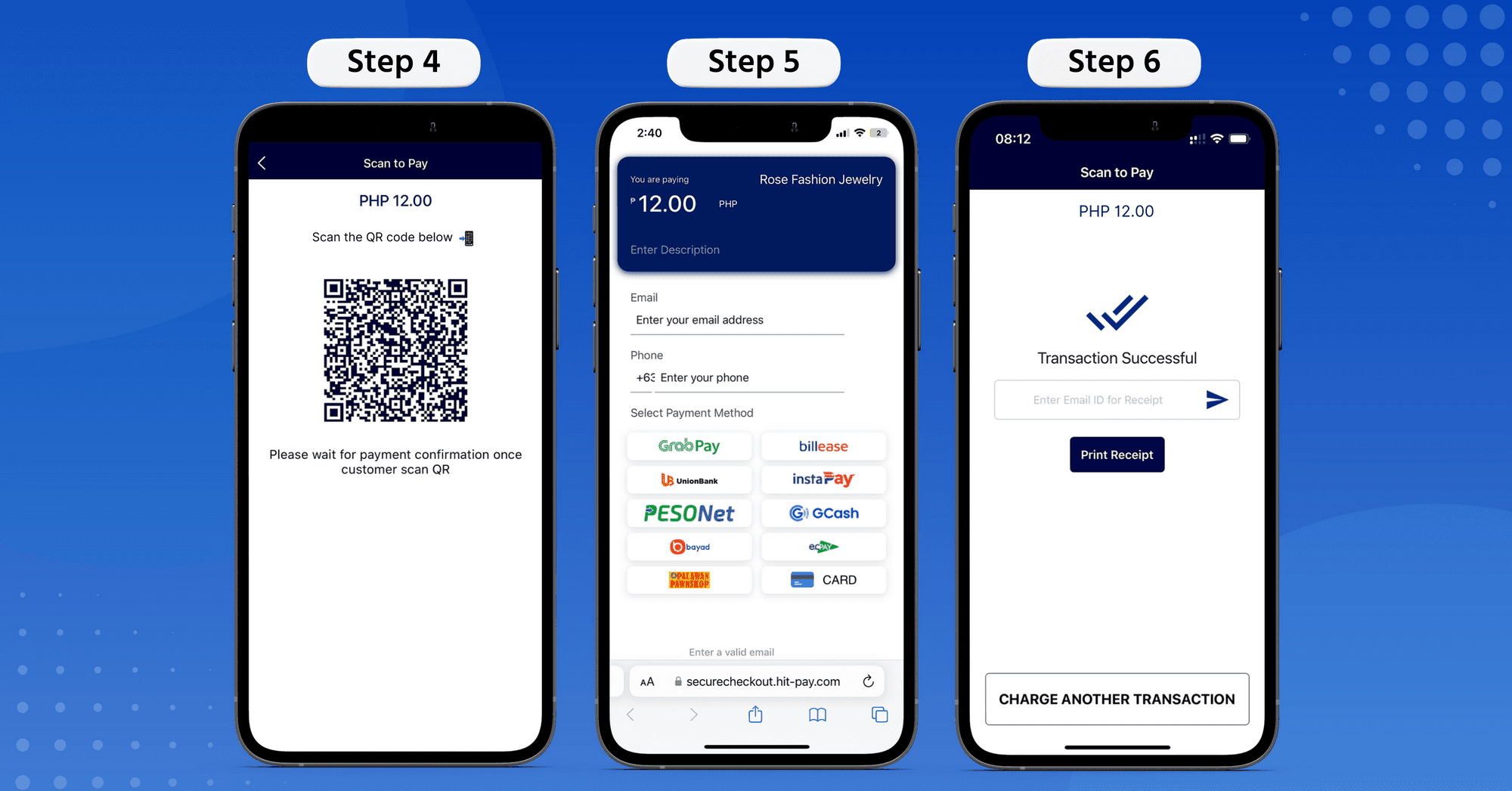
When payment is complete, you'll see the 'Transaction Successful' confirmation screen on your HitPay app.
And you're done!
Try Scan to Pay now on HitPay iOS or Android 📲
Frequently Asked Questions
What is HitPay Scan to Pay?
A way to take in-person payments through the free HitPay app. Your customer scans a QR code shown on your phone and pays from their own phone, so no card terminal is involved.
How do I use Scan to Pay?
Three steps. Open the HitPay app, enter the amount and press Charge. Select Scan to Pay from the dropdown. Ask your customer to scan the generated QR code.
Which payments does Scan to Pay accept in the Philippines?
Digital payments generally, which is what makes it useful for a counter that wants to cover more than cards.
Do I need a credit card terminal?
No. Scan to Pay is simpler than a terminal and can be set up instantly on the HitPay app for iOS or Android.
Accept in-person payments with HitPay Scan to Pay
Author:
The HitPay Team
Last Updated:
Accept easy in-person payments with Scan to Pay — now available in the Philippines.
With Scan to Pay, you can accept in-person payments directly through the free HitPay app! It's simpler than a credit card terminal and can be set up instantly.
Why use Scan to Pay?
🤳🏻 Completely contactless — With Scan to Pay, you can easily accept all digital payments in the Philippines. Your customer simply scans the QR code on your HitPay app, and makes payment on their own phone.
⚡️Extremely efficient — Scan and pay in just seconds. All you need is the HitPay iOS or Android app on your phone.
💰 Full range of HitPay payment methods — Scan to Pay supports all popular payment methods in the Philippines:
Unionbank Online
Instapay
QR Ph
PESONet
GCash
Over the counter payments
Domestic and International Cards
Billease
GrabPay
📧 Easy remarketing — The Scan to Pay feature helps collect customer emails for your future marketing needs.
Syncs with orders anywhere you sell — Scan to Pay automatically syncs with your HitPay-enabled payments on any sales channel. Learn more about our useful POS software features here.
⚡️Free to install — The HitPay app is free to install and use on your phone. Only pay per transaction.
How to use HitPay Scan to Pay
You can use Scan to Pay in just 3 simple steps.
Step 1: Open the HitPay app on your phone.
Enter the amount to charge and press the blue Charge button
Step 2: Select Scan to Pay payment method from the dropdown menu
Step 3: Ask your customer to scan the generated QR using their phone camera or QR code scanner.
After scanning the QR code, the customer can select their preferred payment method and complete the payment. This is done securely on your customer's phone.
When payment is complete, you'll see the 'Transaction Successful' confirmation screen on your HitPay app.
And you're done!
Try Scan to Pay now on HitPay iOS or Android 📲
Frequently Asked Questions
What is HitPay Scan to Pay?
A way to take in-person payments through the free HitPay app. Your customer scans a QR code shown on your phone and pays from their own phone, so no card terminal is involved.
How do I use Scan to Pay?
Three steps. Open the HitPay app, enter the amount and press Charge. Select Scan to Pay from the dropdown. Ask your customer to scan the generated QR code.
Which payments does Scan to Pay accept in the Philippines?
Digital payments generally, which is what makes it useful for a counter that wants to cover more than cards.
Do I need a credit card terminal?
No. Scan to Pay is simpler than a terminal and can be set up instantly on the HitPay app for iOS or Android.
Accept in-person payments with HitPay Scan to Pay
Author:
The HitPay Team
Last Updated:
Accept easy in-person payments with Scan to Pay — now available in the Philippines.
With Scan to Pay, you can accept in-person payments directly through the free HitPay app! It's simpler than a credit card terminal and can be set up instantly.
Why use Scan to Pay?
🤳🏻 Completely contactless — With Scan to Pay, you can easily accept all digital payments in the Philippines. Your customer simply scans the QR code on your HitPay app, and makes payment on their own phone.
⚡️Extremely efficient — Scan and pay in just seconds. All you need is the HitPay iOS or Android app on your phone.
💰 Full range of HitPay payment methods — Scan to Pay supports all popular payment methods in the Philippines:
Unionbank Online
Instapay
QR Ph
PESONet
GCash
Over the counter payments
Domestic and International Cards
Billease
GrabPay
📧 Easy remarketing — The Scan to Pay feature helps collect customer emails for your future marketing needs.
Syncs with orders anywhere you sell — Scan to Pay automatically syncs with your HitPay-enabled payments on any sales channel. Learn more about our useful POS software features here.
⚡️Free to install — The HitPay app is free to install and use on your phone. Only pay per transaction.
How to use HitPay Scan to Pay
You can use Scan to Pay in just 3 simple steps.
Step 1: Open the HitPay app on your phone.
Enter the amount to charge and press the blue Charge button
Step 2: Select Scan to Pay payment method from the dropdown menu
Step 3: Ask your customer to scan the generated QR using their phone camera or QR code scanner.
After scanning the QR code, the customer can select their preferred payment method and complete the payment. This is done securely on your customer's phone.
When payment is complete, you'll see the 'Transaction Successful' confirmation screen on your HitPay app.
And you're done!
Try Scan to Pay now on HitPay iOS or Android 📲
Frequently Asked Questions
What is HitPay Scan to Pay?
A way to take in-person payments through the free HitPay app. Your customer scans a QR code shown on your phone and pays from their own phone, so no card terminal is involved.
How do I use Scan to Pay?
Three steps. Open the HitPay app, enter the amount and press Charge. Select Scan to Pay from the dropdown. Ask your customer to scan the generated QR code.
Which payments does Scan to Pay accept in the Philippines?
Digital payments generally, which is what makes it useful for a counter that wants to cover more than cards.
Do I need a credit card terminal?
No. Scan to Pay is simpler than a terminal and can be set up instantly on the HitPay app for iOS or Android.

Ready to apply what you just read?
Turn payment insights into action with HitPay’s online and in-person payment tools for growing businesses.
Ready to apply what you just read?
Turn payment insights into action with HitPay’s online and in-person payment tools for growing businesses.
Ready to apply what you just read?
Turn payment insights into action with HitPay’s online and in-person payment tools for growing businesses.
Ready to apply what you just read?
Turn payment insights into action with HitPay’s online and in-person payment tools for growing businesses.
Ready to apply what you just read?
Turn payment insights into action with HitPay’s online and in-person payment tools for growing businesses.