Online
Cross - Border
See Their Success Stories
Discover how businesses are growing with HitPay, through real stories, results, and experiences from our merchants.
See How Merchants Use HitPay
Developer Resources
Explore our comprehensive developer resources designed to enhance your experience. From detailed API documentation to interactive tutorials.
Introducing HitPay.JS — Drop-In Checkout UI
Author:
The HitPay Team
Last Updated:
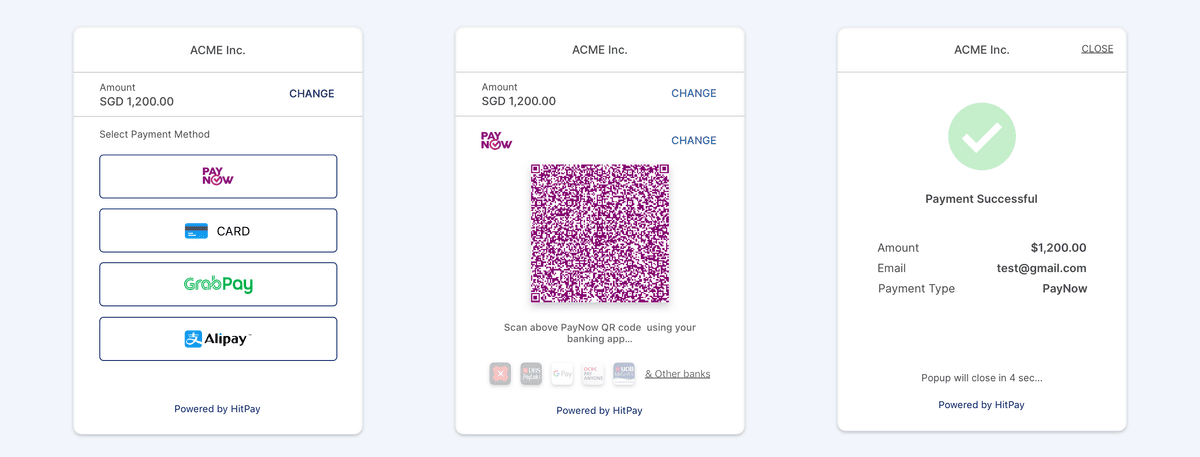
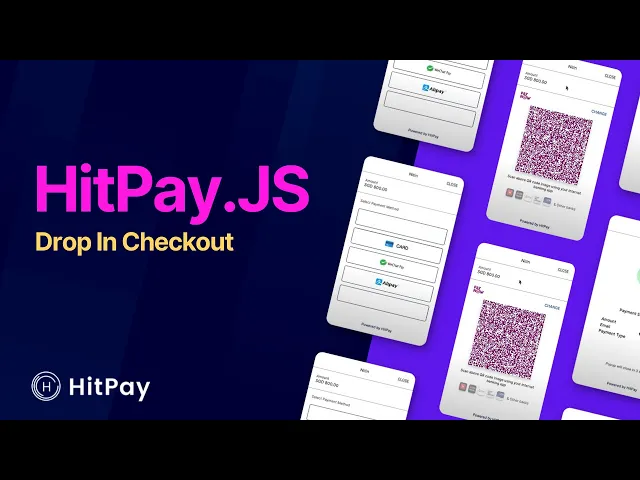
With the new Drop-In checkout UI, you will now be able to provide a seamless checkout experience. Unlike the redirect checkout page, the drop-in is embedded into your webpage so your customer will never have to leave your site.
Watch it in action
Donation Link
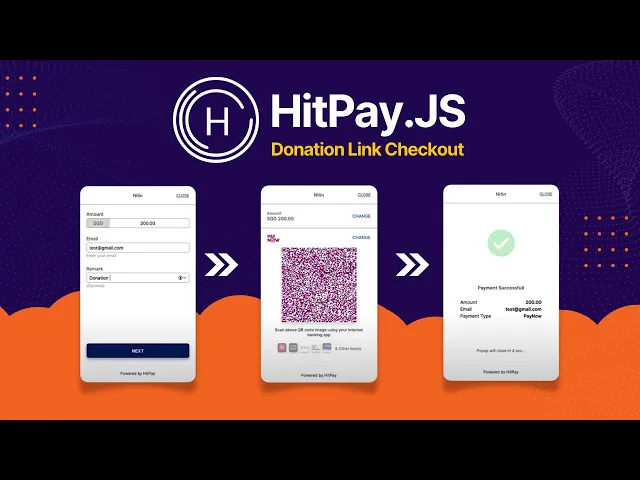
Drop-in UI also allows you to collect payments from any customer for any amount. This opens the door for many use-cases like “Tip Jar”, “Donation Button” and any Adhoc payments on your website.
Integration
The integration steps and the process will be similar to the re-direct checkout page http://hit-pay.com/docs.html
Once a payment request is generated by your backend, you can use the payment_request_id and hitpay.js to present the drop in UI
// Include hitpay.js in your website
<script src="<https://sandbox.hit-pay.com/hitpay.js>"></script>
// Initialise
// DEFAULT_URL = <https://securecheckout.hit-pay.com/payment-request/@test/>
window.HitPay.init('DEFAULT_URL', {
  // Optional
  // closeOnError: true
},
  // Optional callbacks
{
    onClose: onClose,
    onSuccess: onSuccess,
    onError: onError
})
// Show Drop In UI
window.HitPay.toggle({
    paymentRequest: '93d015df-b0b6-4cbd-8a4b-938eb79e33b2'
})
// Include hitpay.js in your website
<script src="<https://sandbox.hit-pay.com/hitpay.js>"></script>
// Initialise
// DEFAULT_URL = <https://securecheckout.hit-pay.com/payment-request/@test/>
window.HitPay.init('DEFAULT_URL', {
  // Optional
  // closeOnError: true
},
  // Optional callbacks
{
    onClose: onClose,
    onSuccess: onSuccess,
    onError: onError
})
// Show Drop In UI
window.HitPay.toggle({
    paymentRequest: '93d015df-b0b6-4cbd-8a4b-938eb79e33b2'
})
// Include hitpay.js in your website
<script src="<https://sandbox.hit-pay.com/hitpay.js>"></script>
// Initialise
// DEFAULT_URL = <https://securecheckout.hit-pay.com/payment-request/@test/>
window.HitPay.init('DEFAULT_URL', {
  // Optional
  // closeOnError: true
},
  // Optional callbacks
{
    onClose: onClose,
    onSuccess: onSuccess,
    onError: onError
})
// Show Drop In UI
window.HitPay.toggle({
    paymentRequest: '93d015df-b0b6-4cbd-8a4b-938eb79e33b2'
})
Sample code
https://github.com/hit-pay/hitpay-js-example/blob/master/index.html
Frequently Asked Questions
What is the HitPay Drop-In checkout UI?
HitPay.JS embeds the checkout directly into your web page, so the customer completes payment without ever leaving your site. The redirect checkout page sends them away; the drop-in does not.
How do I integrate the Drop-In UI?
The steps mirror the redirect checkout page. Once your backend generates a payment request, pass the payment_request_id to hitpay.js and it presents the drop-in UI.
Can I collect an arbitrary amount with the Drop-In UI?
Yes. It supports payments of any amount from any customer, which covers a tip jar, a donation button or any ad hoc payment on your website.
Where are the integration docs?
The HitPay developer documentation covers the drop-in alongside the redirect checkout page, since the integration process is the same up to the point where you present the UI.
Introducing HitPay.JS — Drop-In Checkout UI
Author:
The HitPay Team
Last Updated:
With the new Drop-In checkout UI, you will now be able to provide a seamless checkout experience. Unlike the redirect checkout page, the drop-in is embedded into your webpage so your customer will never have to leave your site.
Watch it in action
Donation Link
Drop-in UI also allows you to collect payments from any customer for any amount. This opens the door for many use-cases like “Tip Jar”, “Donation Button” and any Adhoc payments on your website.
Integration
The integration steps and the process will be similar to the re-direct checkout page http://hit-pay.com/docs.html
Once a payment request is generated by your backend, you can use the payment_request_id and hitpay.js to present the drop in UI
// Include hitpay.js in your website
<script src="<https://sandbox.hit-pay.com/hitpay.js>"></script>
// Initialise
// DEFAULT_URL = <https://securecheckout.hit-pay.com/payment-request/@test/>
window.HitPay.init('DEFAULT_URL', {
  // Optional
  // closeOnError: true
},
  // Optional callbacks
{
    onClose: onClose,
    onSuccess: onSuccess,
    onError: onError
})
// Show Drop In UI
window.HitPay.toggle({
    paymentRequest: '93d015df-b0b6-4cbd-8a4b-938eb79e33b2'
})
Sample code
https://github.com/hit-pay/hitpay-js-example/blob/master/index.html
Frequently Asked Questions
What is the HitPay Drop-In checkout UI?
HitPay.JS embeds the checkout directly into your web page, so the customer completes payment without ever leaving your site. The redirect checkout page sends them away; the drop-in does not.
How do I integrate the Drop-In UI?
The steps mirror the redirect checkout page. Once your backend generates a payment request, pass the payment_request_id to hitpay.js and it presents the drop-in UI.
Can I collect an arbitrary amount with the Drop-In UI?
Yes. It supports payments of any amount from any customer, which covers a tip jar, a donation button or any ad hoc payment on your website.
Where are the integration docs?
The HitPay developer documentation covers the drop-in alongside the redirect checkout page, since the integration process is the same up to the point where you present the UI.
Introducing HitPay.JS — Drop-In Checkout UI
Author:
The HitPay Team
Last Updated:
With the new Drop-In checkout UI, you will now be able to provide a seamless checkout experience. Unlike the redirect checkout page, the drop-in is embedded into your webpage so your customer will never have to leave your site.
Watch it in action
Donation Link
Drop-in UI also allows you to collect payments from any customer for any amount. This opens the door for many use-cases like “Tip Jar”, “Donation Button” and any Adhoc payments on your website.
Integration
The integration steps and the process will be similar to the re-direct checkout page http://hit-pay.com/docs.html
Once a payment request is generated by your backend, you can use the payment_request_id and hitpay.js to present the drop in UI
// Include hitpay.js in your website
<script src="<https://sandbox.hit-pay.com/hitpay.js>"></script>
// Initialise
// DEFAULT_URL = <https://securecheckout.hit-pay.com/payment-request/@test/>
window.HitPay.init('DEFAULT_URL', {
  // Optional
  // closeOnError: true
},
  // Optional callbacks
{
    onClose: onClose,
    onSuccess: onSuccess,
    onError: onError
})
// Show Drop In UI
window.HitPay.toggle({
    paymentRequest: '93d015df-b0b6-4cbd-8a4b-938eb79e33b2'
})
Sample code
https://github.com/hit-pay/hitpay-js-example/blob/master/index.html
Frequently Asked Questions
What is the HitPay Drop-In checkout UI?
HitPay.JS embeds the checkout directly into your web page, so the customer completes payment without ever leaving your site. The redirect checkout page sends them away; the drop-in does not.
How do I integrate the Drop-In UI?
The steps mirror the redirect checkout page. Once your backend generates a payment request, pass the payment_request_id to hitpay.js and it presents the drop-in UI.
Can I collect an arbitrary amount with the Drop-In UI?
Yes. It supports payments of any amount from any customer, which covers a tip jar, a donation button or any ad hoc payment on your website.
Where are the integration docs?
The HitPay developer documentation covers the drop-in alongside the redirect checkout page, since the integration process is the same up to the point where you present the UI.

Ready to apply what you just read?
Turn payment insights into action with HitPay’s online and in-person payment tools for growing businesses.
Ready to apply what you just read?
Turn payment insights into action with HitPay’s online and in-person payment tools for growing businesses.
Ready to apply what you just read?
Turn payment insights into action with HitPay’s online and in-person payment tools for growing businesses.
Ready to apply what you just read?
Turn payment insights into action with HitPay’s online and in-person payment tools for growing businesses.
Ready to apply what you just read?
Turn payment insights into action with HitPay’s online and in-person payment tools for growing businesses.