Payments
Get started with HitPay
Our team is here to answer your questions and help you get started with easw
Turn your receipts into powerful marketing tools with HitPay’s receipt maker for businesses
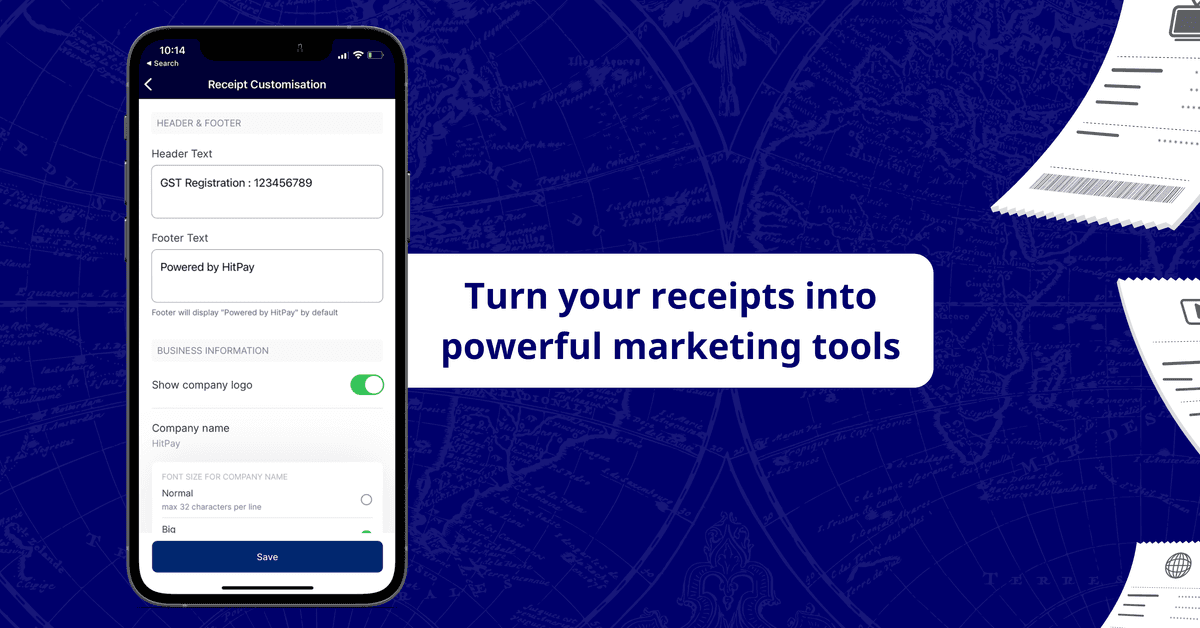
Looking for an easy-to-use point-of-sale (POS) system that comes with paper receipt printing capabilities?
Read on to find out how to turn your paper receipts into opportunities to further market your brand and make a great lasting impression on your customers.
What are receipts used for?
When your customers pay for something you’re selling, you give them a receipt. Receipts act as proof of purchase for your business and your customers to help with:
Accounting
Inventory management
Processing refunds or reimbursements
What goes on a sales receipt?
Your business name, address, and phone number
Date and time of sale
Transaction number
Product or service description
Cost of goods and services
Any relevant taxes
HitPay POS system automatically creates a basic printed (and/or) digital receipt after you’ve made a sale. But why not go a step further? You can turn your receipts into valuable customer touchpoints with a few simple tweaks. Here’s how!
How to market your brand on HitPay POS receipts
Add a personal touch by customising receipts with header or footer text
Use your receipts as an opportunity to put a smile on your customer’s faces and encourage them to come back. Include a warm thank you message, friendly reminders to join your loyalty program, or spotlight an upcoming promotion. It’s a low-cost and easy method to communicate with your customers after the sale.

Example: Use your receipt to include a friendly reminder for members to use their VIP cards.
Add customised header and footer text to your receipts with the HitPay mobile app to give your receipts that personal touch.
Show or hide information on receipts
Selling across multiple stores or locations? Show unique addresses and phone numbers on your receipts, depending on your physical location. HitPay’s receipt maker also allows you to hide your address or phone number on your receipts if you want to keep information private.
Convenient printing options
Skip the hassle of setting up your desk printer by printing receipts straight from your phone with HitPay’s Bluetooth receipt printer. Connect the HitPay app with any Bluetooth-enabled receipt printer, and you’re good to go.
Follow our step-by-step receipt customisation guide here
Turn your phone into a cash register
Besides receipt customisation, HitPay’s POS also comes with other powerful payment tools for your business:
Tap, and you're done! No need to lug around bulky credit card terminals or pay rental fees. Accept credit card payments directly from your mobile device with HitPay’s Tap To Pay.
Scan, pay, repeat: Generate a QR code on your phone for easy in-person payments. That way, selling at a pop-up event is as simple as scanning a code. You’ll save time on cashier duties, perfect for peak sale seasons.
The best part — you can use all these payment tools without any setup or subscription fees.
From credit cards in Singapore to credit cards in the US, HitPay's POS allows you to accept card payments across multiple countries easily.
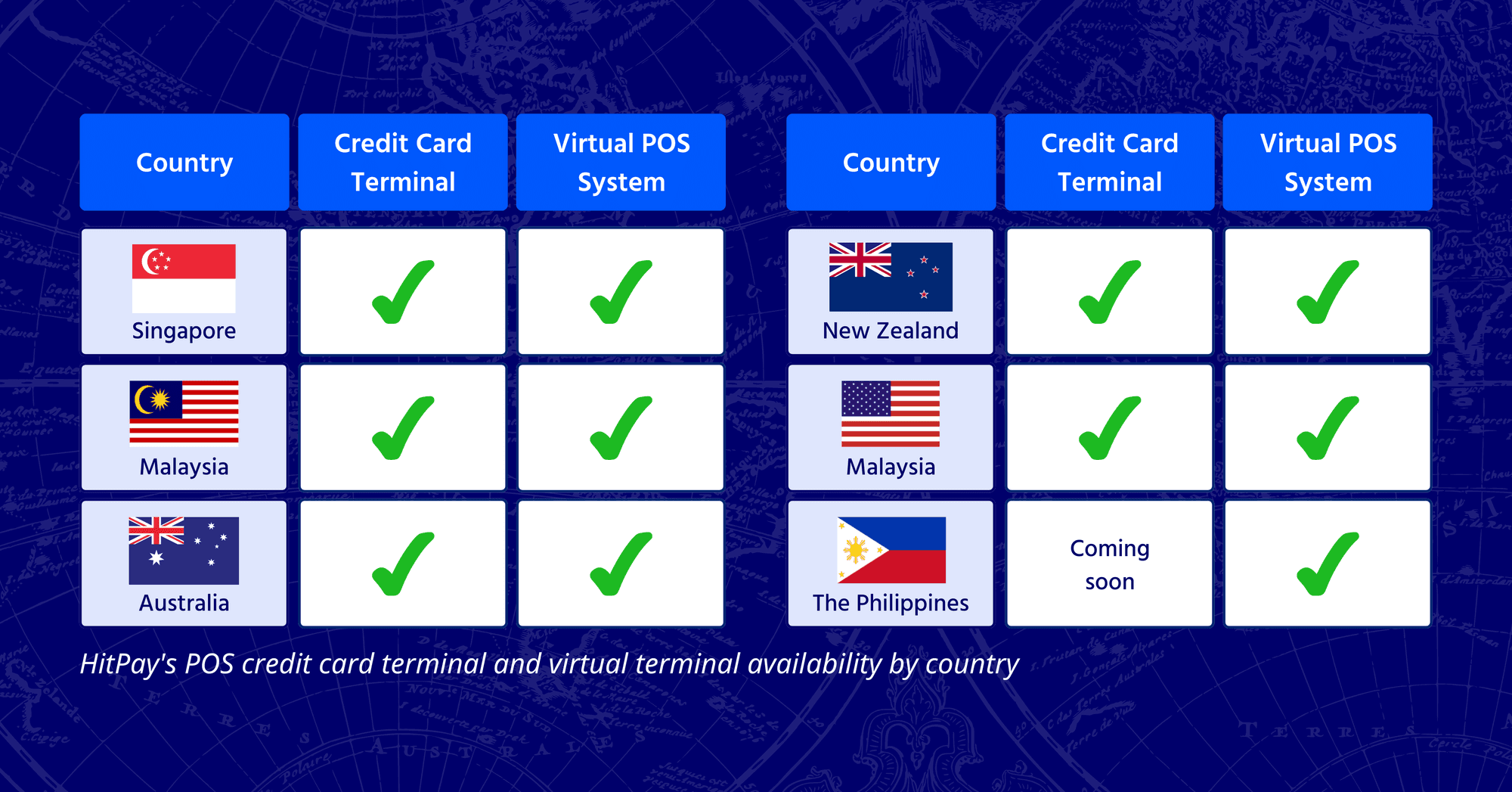
HitPay's POS credit card terminal and virtual terminal availability by country
Read also: How to accept POS payments without a credit card terminal
Set up HitPay’s receipt maker for small businesses
Ready to get started?
1) If you don't have a HitPay account yet, sign up for free on our website.
2) Download the HitPay mobile app for free on Google Play and the Apple App Store
3) Follow this step by step guide on adding a custom header or footer or changing what’s displayed on your receipts.
4) Setup guide for HitPay’s Bluetooth receipt printer to print paper receipts straight from your smartphone.
If you still have questions, feel free to ask our team at support@hit-pay.com. Happy selling!
Turn your receipts into powerful marketing tools with HitPay’s receipt maker for businesses
Looking for an easy-to-use point-of-sale (POS) system that comes with paper receipt printing capabilities?
Read on to find out how to turn your paper receipts into opportunities to further market your brand and make a great lasting impression on your customers.
What are receipts used for?
When your customers pay for something you’re selling, you give them a receipt. Receipts act as proof of purchase for your business and your customers to help with:
Accounting
Inventory management
Processing refunds or reimbursements
What goes on a sales receipt?
Your business name, address, and phone number
Date and time of sale
Transaction number
Product or service description
Cost of goods and services
Any relevant taxes
HitPay POS system automatically creates a basic printed (and/or) digital receipt after you’ve made a sale. But why not go a step further? You can turn your receipts into valuable customer touchpoints with a few simple tweaks. Here’s how!
How to market your brand on HitPay POS receipts
Add a personal touch by customising receipts with header or footer text
Use your receipts as an opportunity to put a smile on your customer’s faces and encourage them to come back. Include a warm thank you message, friendly reminders to join your loyalty program, or spotlight an upcoming promotion. It’s a low-cost and easy method to communicate with your customers after the sale.
Example: Use your receipt to include a friendly reminder for members to use their VIP cards.
Add customised header and footer text to your receipts with the HitPay mobile app to give your receipts that personal touch.
Show or hide information on receipts
Selling across multiple stores or locations? Show unique addresses and phone numbers on your receipts, depending on your physical location. HitPay’s receipt maker also allows you to hide your address or phone number on your receipts if you want to keep information private.
Convenient printing options
Skip the hassle of setting up your desk printer by printing receipts straight from your phone with HitPay’s Bluetooth receipt printer. Connect the HitPay app with any Bluetooth-enabled receipt printer, and you’re good to go.
Follow our step-by-step receipt customisation guide here
Turn your phone into a cash register
Besides receipt customisation, HitPay’s POS also comes with other powerful payment tools for your business:
Tap, and you're done! No need to lug around bulky credit card terminals or pay rental fees. Accept credit card payments directly from your mobile device with HitPay’s Tap To Pay.
Scan, pay, repeat: Generate a QR code on your phone for easy in-person payments. That way, selling at a pop-up event is as simple as scanning a code. You’ll save time on cashier duties, perfect for peak sale seasons.
The best part — you can use all these payment tools without any setup or subscription fees.
From credit cards in Singapore to credit cards in the US, HitPay's POS allows you to accept card payments across multiple countries easily.
HitPay's POS credit card terminal and virtual terminal availability by country
Read also: How to accept POS payments without a credit card terminal
Set up HitPay’s receipt maker for small businesses
Ready to get started?
1) If you don't have a HitPay account yet, sign up for free on our website.
2) Download the HitPay mobile app for free on Google Play and the Apple App Store
3) Follow this step by step guide on adding a custom header or footer or changing what’s displayed on your receipts.
4) Setup guide for HitPay’s Bluetooth receipt printer to print paper receipts straight from your smartphone.
If you still have questions, feel free to ask our team at support@hit-pay.com. Happy selling!
Turn your receipts into powerful marketing tools with HitPay’s receipt maker for businesses
Looking for an easy-to-use point-of-sale (POS) system that comes with paper receipt printing capabilities?
Read on to find out how to turn your paper receipts into opportunities to further market your brand and make a great lasting impression on your customers.
What are receipts used for?
When your customers pay for something you’re selling, you give them a receipt. Receipts act as proof of purchase for your business and your customers to help with:
Accounting
Inventory management
Processing refunds or reimbursements
What goes on a sales receipt?
Your business name, address, and phone number
Date and time of sale
Transaction number
Product or service description
Cost of goods and services
Any relevant taxes
HitPay POS system automatically creates a basic printed (and/or) digital receipt after you’ve made a sale. But why not go a step further? You can turn your receipts into valuable customer touchpoints with a few simple tweaks. Here’s how!
How to market your brand on HitPay POS receipts
Add a personal touch by customising receipts with header or footer text
Use your receipts as an opportunity to put a smile on your customer’s faces and encourage them to come back. Include a warm thank you message, friendly reminders to join your loyalty program, or spotlight an upcoming promotion. It’s a low-cost and easy method to communicate with your customers after the sale.
Example: Use your receipt to include a friendly reminder for members to use their VIP cards.
Add customised header and footer text to your receipts with the HitPay mobile app to give your receipts that personal touch.
Show or hide information on receipts
Selling across multiple stores or locations? Show unique addresses and phone numbers on your receipts, depending on your physical location. HitPay’s receipt maker also allows you to hide your address or phone number on your receipts if you want to keep information private.
Convenient printing options
Skip the hassle of setting up your desk printer by printing receipts straight from your phone with HitPay’s Bluetooth receipt printer. Connect the HitPay app with any Bluetooth-enabled receipt printer, and you’re good to go.
Follow our step-by-step receipt customisation guide here
Turn your phone into a cash register
Besides receipt customisation, HitPay’s POS also comes with other powerful payment tools for your business:
Tap, and you're done! No need to lug around bulky credit card terminals or pay rental fees. Accept credit card payments directly from your mobile device with HitPay’s Tap To Pay.
Scan, pay, repeat: Generate a QR code on your phone for easy in-person payments. That way, selling at a pop-up event is as simple as scanning a code. You’ll save time on cashier duties, perfect for peak sale seasons.
The best part — you can use all these payment tools without any setup or subscription fees.
From credit cards in Singapore to credit cards in the US, HitPay's POS allows you to accept card payments across multiple countries easily.
HitPay's POS credit card terminal and virtual terminal availability by country
Read also: How to accept POS payments without a credit card terminal
Set up HitPay’s receipt maker for small businesses
Ready to get started?
1) If you don't have a HitPay account yet, sign up for free on our website.
2) Download the HitPay mobile app for free on Google Play and the Apple App Store
3) Follow this step by step guide on adding a custom header or footer or changing what’s displayed on your receipts.
4) Setup guide for HitPay’s Bluetooth receipt printer to print paper receipts straight from your smartphone.
If you still have questions, feel free to ask our team at support@hit-pay.com. Happy selling!

Start accepting payments in Singapore today
Join 15,000+ businesses. Set up your free account in minutes, and accept PayNow, cards, and e-wallets the same day.
Start accepting payments in Singapore today
Join 15,000+ businesses. Set up your free account in minutes, and accept PayNow, cards, and e-wallets the same day.
Start accepting payments in Singapore today
Join 15,000+ businesses. Set up your free account in minutes, and accept PayNow, cards, and e-wallets the same day.
Start accepting payments in Singapore today
Join 15,000+ businesses. Set up your free account in minutes, and accept PayNow, cards, and e-wallets the same day.